


Switching between a phone and a desktop can make browsing casino games more convenient, but the two formats are not identical. The casino lussurio website is described as an instant-play service for modern smartphone, tablet and computer browsers, giving Canadian users a browser-based way to move between devices. The practical question is not simply whether a page opens, but whether navigation, information, account controls and game presentation remain manageable on each screen.
What changes when you move from desktop to mobile?
A desktop browser gives you more room for category menus, game thumbnails, promotional details and account information. This can make it easier to compare several titles before selecting one. A larger display is also useful for live-dealer tables, where the interface may contain video, betting controls, statistics and chat elements at the same time. With a mouse and keyboard, switching between pages or reviewing terms can feel more deliberate.
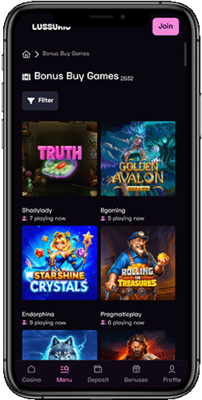
On a phone, the same browser-based experience is designed around a smaller touchscreen. Menus may be condensed, filters may appear behind an icon, and game tiles may be displayed in a single vertical stream. This can be convenient when browsing during a short break, but it may require more scrolling. Landscape orientation can give certain games more horizontal space, while portrait mode is often easier for moving through categories and account pages.
Tablet browsing sits between the two. It offers more room than a phone without requiring a desktop setup, although the exact layout depends on screen size and browser settings. A useful approach is to use a computer for comparing game information and a phone for brief, familiar sessions. Before relying on a device, check that its operating system and browser are current, since older software can affect page loading, display scaling and security.
How should you browse the catalogue on a smaller screen?
Start with the category structure rather than scrolling randomly through every title. The available catalogue is described as covering slots, table games, jackpots, live casino content, video poker, bingo, keno, scratch cards, instant-win titles and crash games. On a phone, a clear category choice reduces unnecessary loading and makes it easier to return to the type of game you intended to examine.
Provider filters can also be useful when they are available. Searching by studio may help you locate a familiar visual style or game mechanic, while a title search is faster when you already know what you want to inspect. However, a filter is a browsing aid, not evidence that a game is suitable for every device. Open the information panel and check whether the game loads properly, whether controls remain visible and whether key rules can be read without excessive zooming.
Do not treat a short mobile preview as proof of expected results, return or volatility. Demonstration play can show how the controls work, but it cannot establish what future outcomes will be. On a smaller display, read the paytable, betting range and any game-specific instructions before making a decision. If text is cut off or buttons overlap, close the title and try a larger screen rather than guessing what an unclear control does.
Which tasks are better suited to a computer?
Desktop access is generally more comfortable for tasks that involve reading, comparing or entering information. Reviewing account terms, checking bonus conditions, inspecting game rules and looking through transaction records can be easier when more content is visible at once. A computer can also be preferable for completing forms because the keyboard makes it simpler to enter names, addresses and contact details accurately.
Verification-related tasks deserve particular care. The available information indicates that identity checks may involve government-issued identification, proof of address and evidence that a payment method belongs to the account holder. A larger screen can make document instructions easier to read and may help you check that uploaded images are clear. Use only the operator’s stated submission process, and avoid sending identity documents through an unverified message or unrelated website.
Desktop browsing is not automatically safer than phone browsing. Security depends on the device, browser, network and account habits. Canada’s Get Cyber Safe guidance offers general advice on protecting accounts and devices online; it does not confirm any casino-specific service or policy. Whichever device you use, sign out on shared computers, keep software updated and avoid saving credentials where other people can access them.
When does mobile browsing become inconvenient?
A phone may be less suitable when the connection is unstable, the battery is low or several browser tabs are open. Live content can also place greater demands on a mobile connection than a standard game page. If a screen freezes during a session, avoid repeatedly pressing buttons, especially when you are unsure whether an action has registered. Wait for the page to respond, then review the account or game history where available.
Touch controls create another limitation. Small buttons can be difficult to select accurately, particularly when a game places several options close together. Screen glare, notifications and accidental taps can interrupt concentration. Turning on “do not disturb,” using a stable connection and keeping the phone on a flat surface may reduce distractions, but these steps cannot eliminate every risk associated with a compact interface.

Some directories describe a downloadable mobile application, but a verifiable official iOS App Store or Android Google Play listing has not been established in the available material. Treat browser access and a native application as different things. Do not install an app from an unverified file or advertisement simply because it promises a faster mobile experience. If the browser version works, it is safer to continue with the known web address and current browser software.
How can you create a practical two-device routine?
Begin by choosing one primary device for account administration and one optional device for browsing. A desktop can be used for reading terms, checking records and handling detailed account tasks, while a phone can be reserved for brief access when the page is familiar. This division reduces the need to complete sensitive forms on a small screen and makes it easier to notice unexpected changes in account activity.
Keep the same basic checks on both devices. Confirm that the address bar shows the expected website, use a private personal connection rather than public Wi-Fi for sensitive activity, and do not share passwords or verification codes. If the service offers account controls such as deposit, wagering, loss or session limits, review them before switching devices. The controls should support a planned routine, not encourage longer or more frequent sessions.
Finally, compare the experience rather than assuming one format is always superior. Note whether categories load quickly, whether game instructions are readable and whether account pages display completely. If a feature appears on one device but not another, refresh the page, check the browser version and look for an official explanation before drawing conclusions. When an account, payment or verification issue remains unresolved, use the stated support channel and keep records of relevant messages.
Mobile and desktop browsing questions
Can the same browser-based account be used on a phone and computer?
The service is described as compatible with modern smartphone, tablet and desktop browsers, so browser access is intended across device types. The exact display and available controls may differ by screen size, operating system and browser. Check the account terms and current on-screen instructions before assuming every function will appear identically.
Is a native mobile app confirmed?
No verifiable official iOS or Android store listing is established in the available information. Some directories may use the word “app” loosely to describe mobile access through a browser. Do not install an unknown file or unofficial application. Use a current browser unless an official store listing and publisher identity can be confirmed.
What should I do if a game does not display properly?
Stop before placing further selections, then check the connection, refresh the page and confirm that the browser is updated. Try changing orientation or moving to a larger screen. If the problem continues, record the title, time and device details and contact the stated support channel rather than repeatedly tapping unclear controls.